

All the benefits of our Label Portal controlled directly from your own system!




Checking available services
POST https://my.ezireturns.com/api/labels/services
Request
You need to specify the weight of the parcel (in KG), the country that the parcel is being returned from and then the postcode of the sender.
Response
Creating a label
POST https://my.ezireturns.com/api/labels/create
Include the serviceID of the service you wish to use. The items array within step3 contains many optional fields but the more you can specify the better.
Request
Response
Downloading a label
POST https://my.ezireturns.com/api/labels/download
Request
Include the id that you received when creating the return.
Response
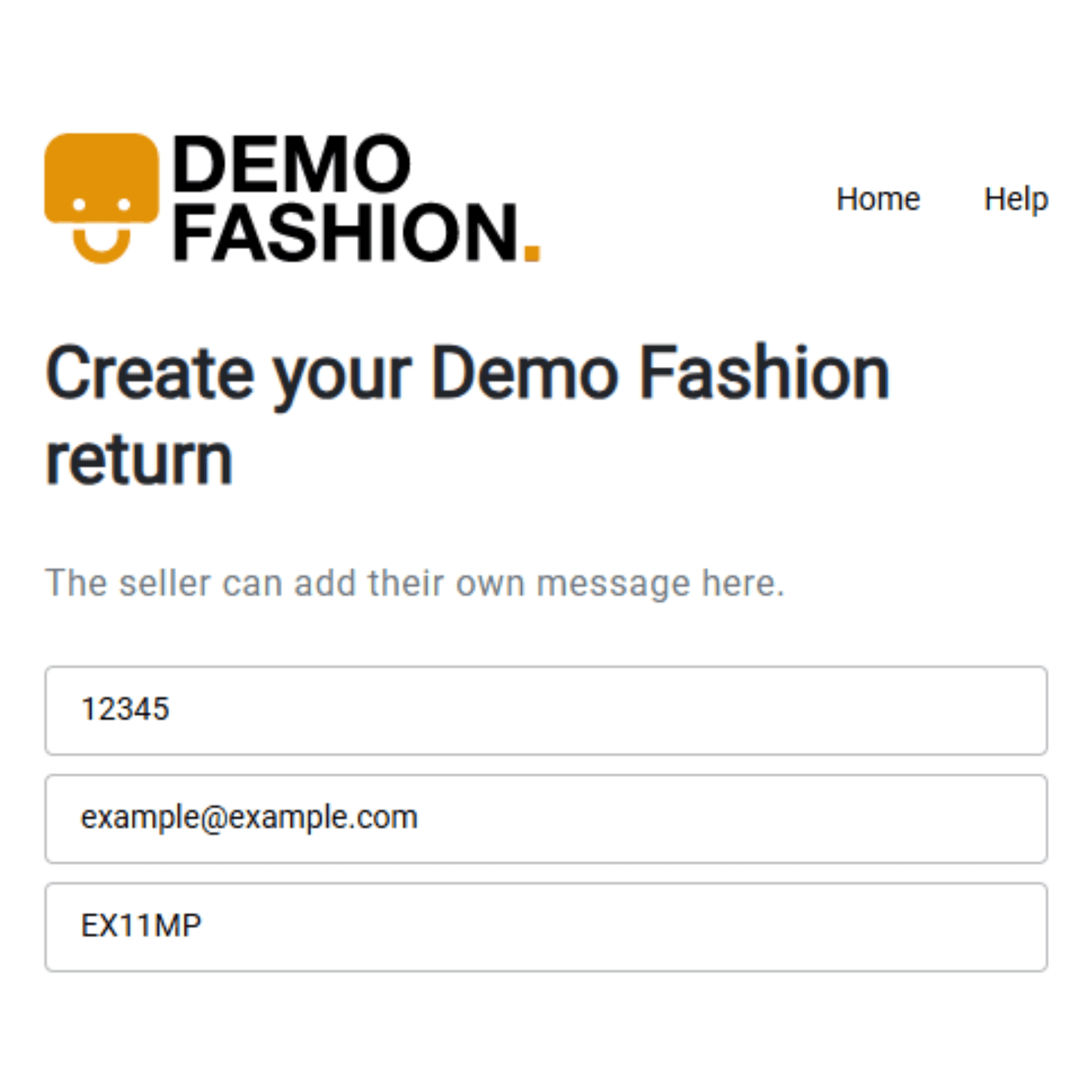
Pre-populated Return Details
Make the returns process even easier for your customers by pre-filling key information within the Ezi Label Portal.
This feature allows you to pre-fill the order number, email address, and postcode when providing a link to your customers by adding query criteria to the link itself! This helps reduce manual entry, speeds up the returns process, and improves the customer experience by allowing customers to begin their return with minimal effort.
For example, providing the following link would autofill the relevant fields as shown in the image shown to the left;
https://labels.ezilabels.com/?order=12345&email=example@example.com&postcode=EX11MP
Other integrations


(previously ChannelAdvisor)













More accurate and comprehensive return information making it easier for you to process refunds & exchanges
